

An easier way to document your databases
dbdesc allows you to document your SQL Server databases automatically in three easy steps:

 TRY IT NOW!
Need more flexibility?
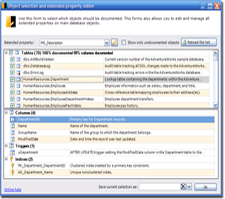
Individual object selection
dbdesc allows you to exclude/include not only full object categories (tables, views, SP, UDF...) but individual objects too.
Built-in SQL Server extended properties editor
dbdesc includes a buil-in extended properties editor that allows you to easily annotate your databases. You can add descriptions to every database object including stored procedure and UDF parameters, tables, views, columns, indices, etc.
Fully customizable output
dbdesc uses XSL templates to parse the documentation and get the final output. dbdesc comes with 5 predesigned templates to get database documentation in HTML, XML, PDF, RTF or Word 2003 file formats. You can customize this templates or build your own from scratch.
Full command-line inteface
dbdesc can be launch from the command line. This allows you to scheduled when do you want to get your databases documented. Many customers are already using dbdesc command-line interface to integrate database documentation in their build process.
Start documenting your databases in seconds
You can try dbdesc right now. No registration needed. This is a full featured working version of dbdesc. If you find dbdesc useful, please register your copy.

 DOWNLOAD NOW
 PURCHASE
NOW
PURCHASE
NOW